KabataanOS

The operating system for SK finances.

Record each transaction once. KabataanOS fills in every COA form, keeps your registers and books, computes the taxes, and checks your records before the COA Auditor does.

Beta now open · 6 months free for beta testers · Join by December 31, 2026
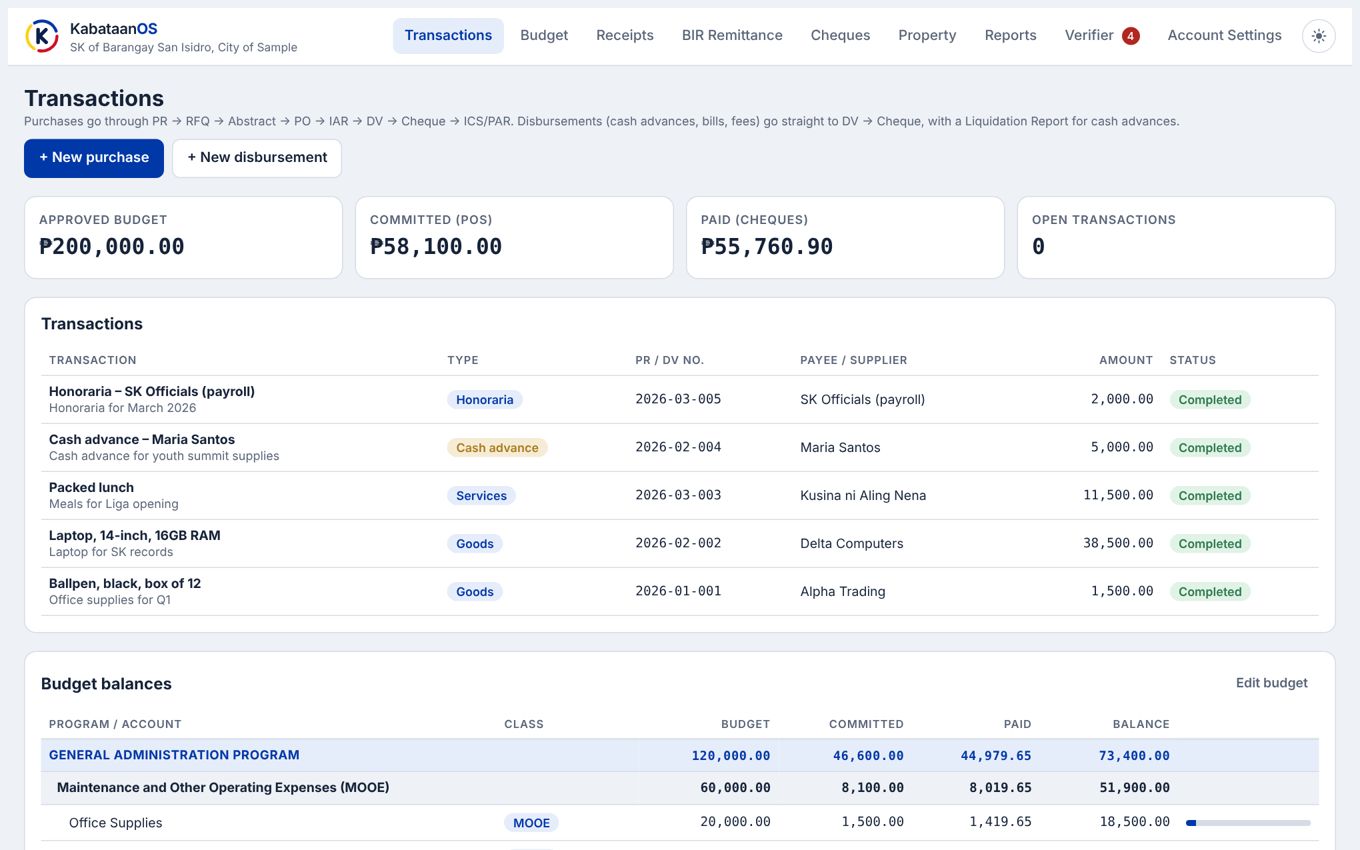
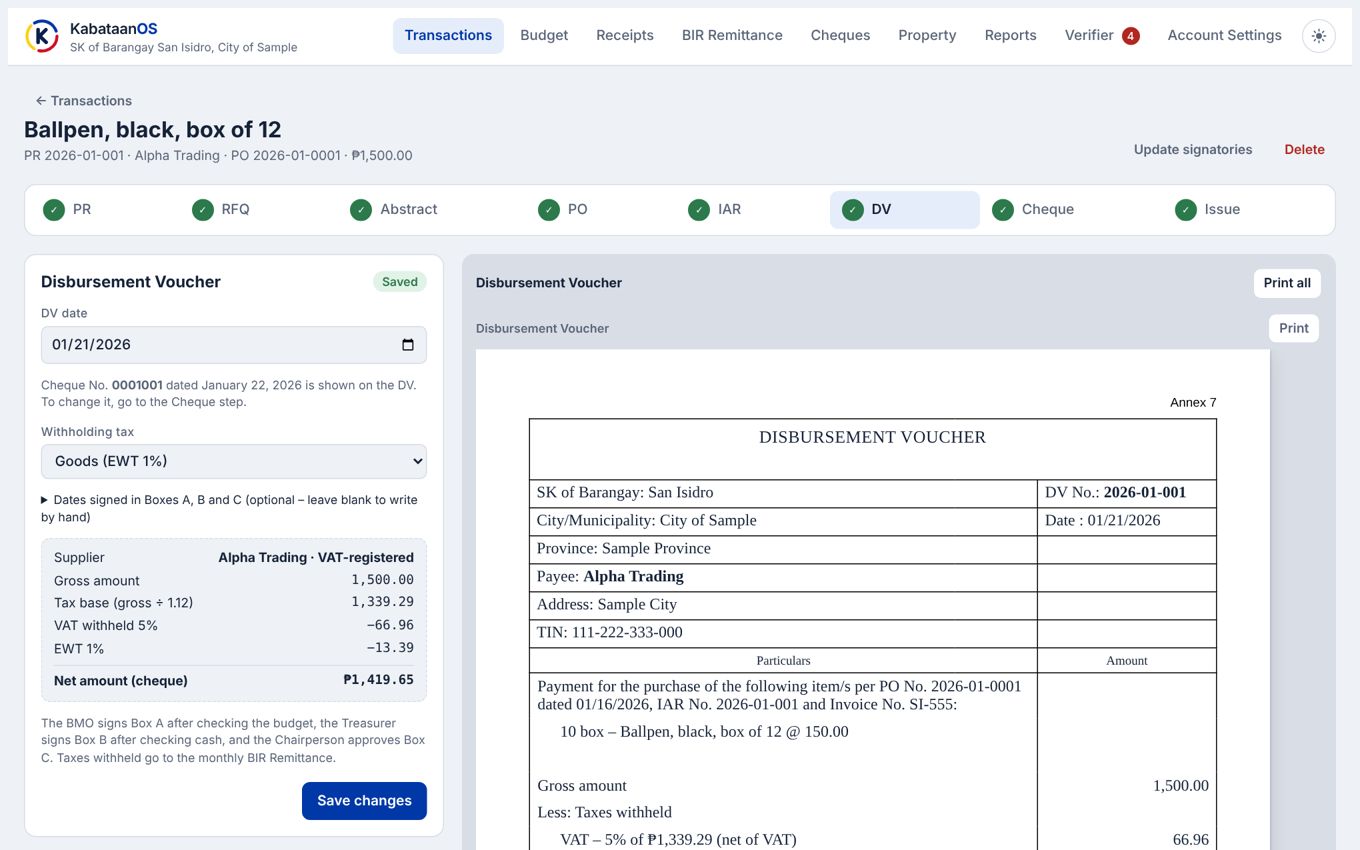
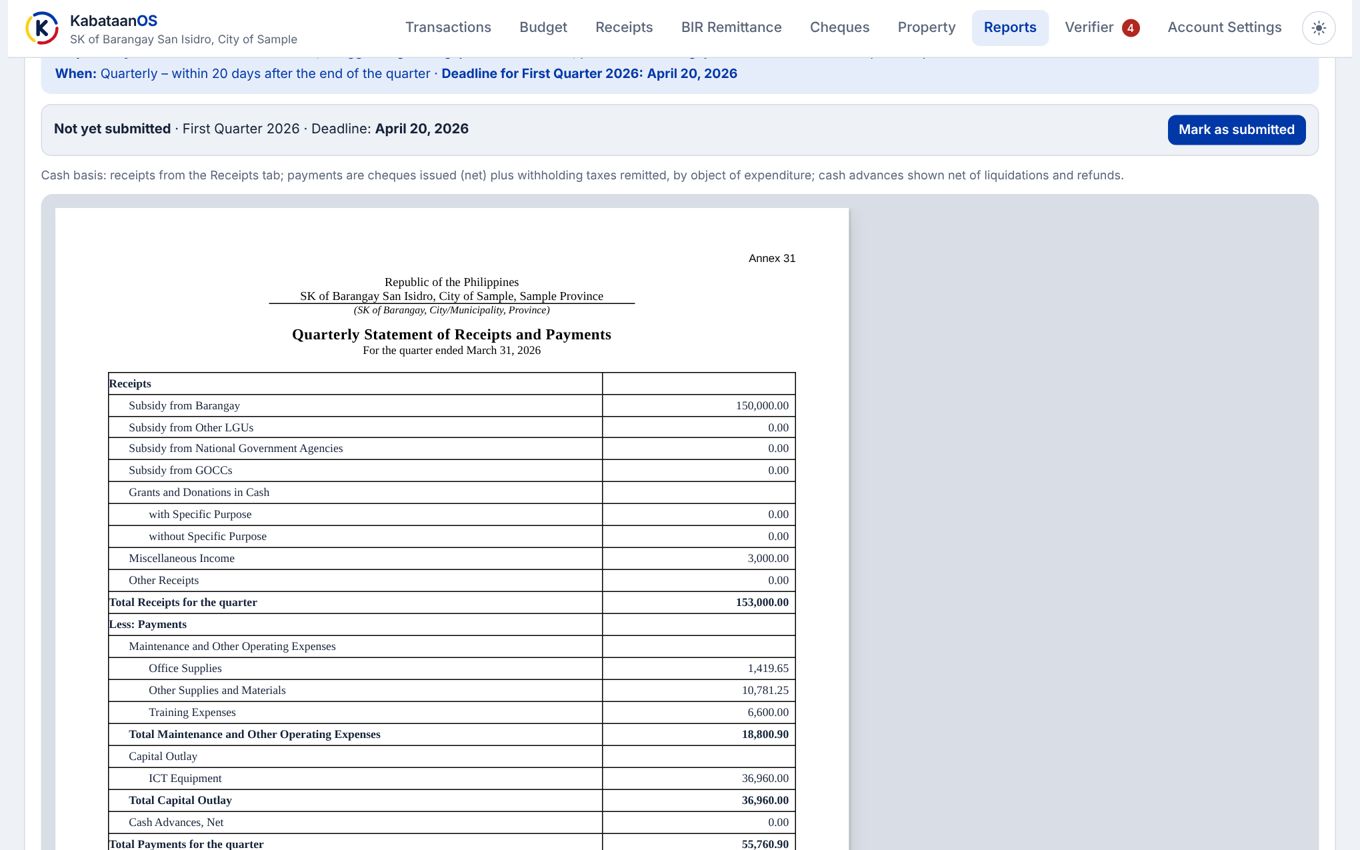
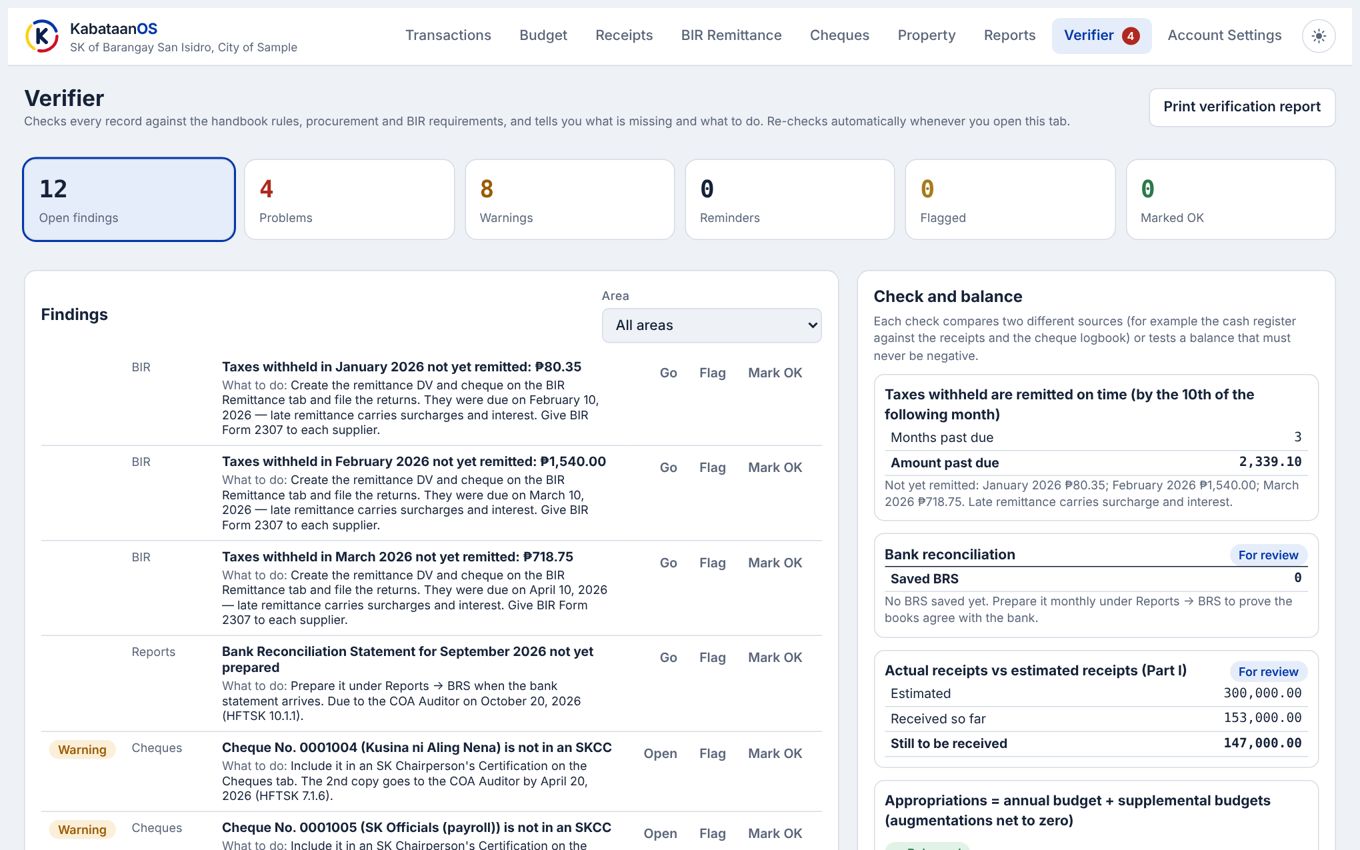
KabataanOS Transactions screen with budget, committed and paid totals and a list of purchases A purchase in KabataanOS with the Disbursement Voucher filled in and taxes computed The Quarterly Statement of Receipts and Payments generated by KabataanOS The KabataanOS Verifier listing problems and warnings to fix
Follows the COA Handbook on SK Financial Transactions RA 12009 procurement steps BIR withholding rules Built by a sitting SK Chairperson and Treasurer
How it works

Before, you wrote it on every form.
Now, you type it once.

Same purchase, same ₱1,500. See the difference.

Before

By hand, one form at a time

PR10 boxes ballpens₱1,500.00Juan Store
RFQ10 boxes ballpens₱1,500.00Juan Store
Abstract10 boxes ballpens₱1,500.00Juan Store
PO10 boxes ballpens₱1,500.00Juan Store
IAR10 boxes ballpens₱1,500.00Juan Store
DV10 boxes ballpens₱1,500.00Juan Store
Cheque10 boxes ballpens₱1,500.00Juan Store
×0times written
  • Write the same item, amount and supplier on every form
  • Post it again in the cash book, registry and check logbook
  • Compute the taxes by hand
  • One wrong digit, and the forms no longer match
Now, with KabataanOS

Type once. Everything is filled in.

New purchase
Item10 boxes ballpens
Amount₱1,500.00
SupplierJuan Store
All 7 forms ready to print · or save as PDF
  • Every form filled in and numbered for you
  • Cash book, registry and check logbook updated together
  • Taxes computed, ready for the BIR remittance
  • Same numbers on every page, no mismatch

A new purchase, from PR to cheque to reports

Fill in the request once and print. At each next step, add only what is new, and print again.

    Features

    Everything the SK Treasurer, Chairperson and BMO keep, in one place.

    Highlight

    COA reports, ready to submit

    Every report your COA Auditor asks for is prepared from what you already recorded. No more copying totals from the books into each report.

    • In the format of the COA Handbook for SK (HFTSK)
    • Totals tie to your cash books and budget, so the reports agree
    • Each report shows its deadline, with reminders before it is due
    • Print, sign and submit, then mark it as submitted
    1. MonthlyBRSBank Reconciliation StatementBy the 20th of the next monthReady
    2. QuarterlyQSRPQuarterly Statement of Receipts and PaymentsWithin 20 days after the quarterReady
    3. RAAFReport of Accountability for Accountable FormsWithin 20 days after the quarterReady
    4. SBCPBSummary of Budget, Commitments, Payments and BalancesWithin 20 days after the quarterReady
    5. AnnualASRPAnnual Statement of Receipts and PaymentsWithin 60 days after the yearReady
    6. SCBAAStatement of Comparison of Budget and Actual AmountsWithin 60 days after the yearReady
    7. NFSNotes to Financial StatementsWithin 60 days after the yearReady
    8. InventoryRIPSM · RIPPEInventory of supplies and of property and equipmentSupplies: Jan 31 and Jul 31 · Equipment: Jan 31Ready
    Office Supplies
    Liga ng Kabataan
    Youth summit

    Budget that stays current

    Every PR and voucher is charged to a budget line. See what is committed, paid and still available, and get a warning before a line runs out.

    OR 0101+3,000.00
    Chk 1001−1,419.65
    Chk 1002−36,960.00
    Balance96,839.10

    Cash books kept for you

    The cash receipts register (RCRD), cash in bank register (RCB) and logbook of checks fill themselves from your receipts and cheques.

    Gross amount1,500.00
    VAT withheld 5%66.96
    EWT 1%13.39
    Net to supplier1,419.65

    BIR taxes done right

    VAT, percentage tax and expanded withholding are computed on every payment. The monthly remittance and BIR Form 2307 are ready to file.

    QSRPSBCPBBRSRAAF

    Never miss a deadline

    A calendar of every COA and BIR deadline. Mark each report as submitted, and see what is still due this month at a glance.

    Tax withheld not yet remittedFIX
    RFQ sent to only 2 suppliersCHECK
    Refund not yet depositedFIX
    Collections deposited intactOK

    The Verifier

    Checks your records every day against the handbook, procurement and BIR rules, and tells you what to fix, so mistakes are caught before an audit.

    Laptop · PAR 2026-003₱38,500.00 · received Jan 22● Held by: SK Treasurer

    Property, accounted for

    Stock cards, property cards, ICS and PAR, returns, repairs, transfers and the inventory count. Always know who holds what.
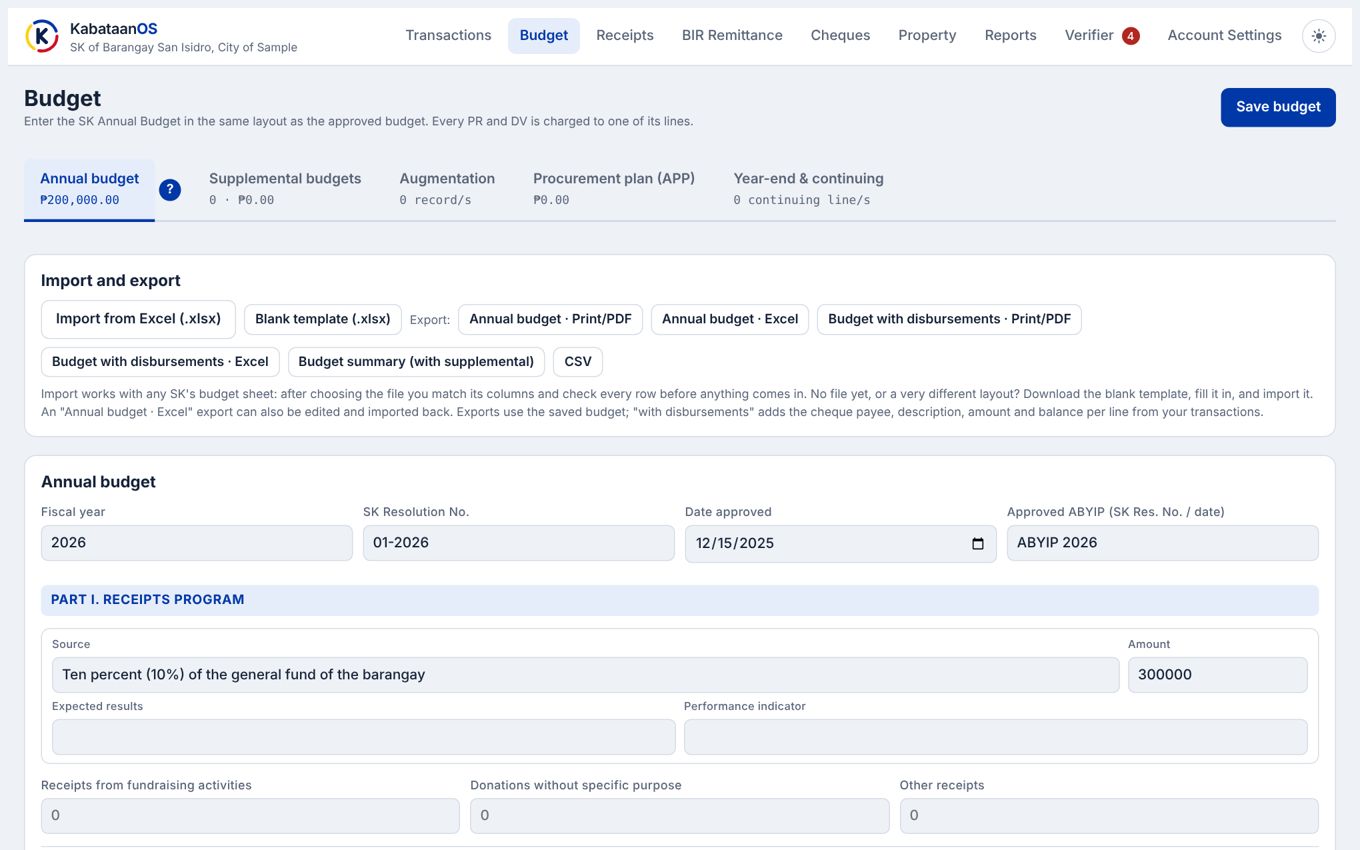
    Transactions screen A purchase with its Disbursement Voucher Budget screen Reports screen with the Quarterly Statement of Receipts and Payments Verifier screen
    For your whole SK

    Each official sees what they need. Nobody chases updates.

    C

    SK Chairperson

    • Sees every transaction and its status
    • Approves and signs with complete papers
    • Invites the Treasurer and BMO
    T

    SK Treasurer

    • Records purchases, collections and payments
    • Prints the forms, cheques and books
    • Prepares the reports for COA
    B

    Budget Monitoring Officer

    • Watches the budget and registries
    • Prints the budget reports
    • View only: cannot change transactions
    Only your SKEach SK sees only its own records.
    Two-step sign-inAn authenticator app or a code by email, for everyone.
    Data privacyHandled under the Data Privacy Act (RA 10173).
    Laptop or phoneWorks in the browser. Nothing to install.
    The beta

    The app is built. Help us test it with real SK records.

    We are opening KabataanOS to a first group of SKs for 2027. Beta testers use it for their real transactions from January, and tell us what to improve.

    For beta testers

    6 months free

    January to June 2027

    • Full access for the Chairperson, Treasurer and BMO
    • Help setting up your officials, bank account and 2027 budget
    • A direct line to the people who build it
    • A special founding price if you stay
    --days
    --hours
    --mins

    Applications close December 31, 2026.

    1. Now to Dec 31, 2026ApplyFill in the form. It takes about two minutes.
    2. Within a few daysWe confirm your SKWe check your application and send the SK Chairperson an invitation by email.
    3. January 2027Set upAdd your officials, bank account and approved 2027 budget, with our help.
    4. January to June 2027Use it, freeRecord your real transactions, print your forms and reports.
    5. Along the wayTell us what to improveMessage us from the in-app chat. Your feedback shapes the app.

    Join the beta

    For SK Chairpersons and SK Treasurers. We reply by email.

    Questions

    Frequently asked questions

    Is the beta really free?

    Yes. Beta testers use KabataanOS free from January to June 2027, and SKs that start early in the 4th quarter of 2026 use it free too. Before the beta ends, we will offer a special founding price to SKs that want to continue. You are not charged anything to join.

    Does it follow the COA rules for SK funds?

    KabataanOS follows the COA Handbook on the Financial Transactions of the Sangguniang Kabataan: its forms, registries, reports and deadlines. It also follows the RA 12009 procurement steps and the BIR withholding rules. It is a tool built by an SK official and is not issued or endorsed by COA; your COA Auditor remains the final authority.

    Who can apply?

    Any Sangguniang Kabataan in the Philippines. The application should come from the SK Chairperson or SK Treasurer, since the Chairperson receives the invitation and adds the other officials.

    Is our data safe?

    Each SK sees only its own records, everyone signs in with a second step (an authenticator app or an email code), and the BMO can view but not change transactions. Personal information is handled under the Data Privacy Act of 2012 (RA 10173).

    Do we need a computer?

    A laptop is best for printing forms, but KabataanOS works in the browser on a phone too. There is nothing to install.

    Can we try it before January?

    Yes. After you are approved, you choose how to start: try it now for the 4th quarter of 2026, start fresh on January 1, 2027, or use it for the whole of 2026. For the 4th-quarter trial you enter only your balances as of October 1 and the budget already used, with no need to re-enter older records. Keep your paper books as the official records during the trial, then start 2027 fresh in the app.

    We already started 2026 on paper. Can we still join?

    Yes. You can start fresh on January 1, 2027, try it from the 4th quarter of 2026, or bring in this year's earlier receipts and payments so your 2026 annual reports come from the app. Existing property can be added too.

    What happens after we apply?

    We check your application and email the SK Chairperson an invitation to create the SK's account at app.kabataan-os.com. You choose whether to try it now for the 4th quarter of 2026 or start on January 1, 2027, and we help you set up your officials, bank account and budget.

    Start 2027 with your books already in order.

    Join the KabataanOS beta before December 31, 2026.